
Connected AIs
Ask your AI. It draws in your notebook.
Connect Claude, ChatGPT or another AI app to your Circuit Notebook account. It reads your sheets, explains them, and draws circuits you can edit like your own.
Connect your AI Opens on 1 December, with Circuit Notebook 1.0
Use the AI you already have: no extra subscription. A free account gets 40 drawing steps a day.
You “Draw the LED circuit of my lab.”
search_libraryfinds the LED and where its pins aredrawplaces 4 parts, 3 wires and two formulas, in one gocheck_sheetfinds nothing to fixview_sheetlooks at the result
What it does in your notebook
-
“What does this circuit do?”
It explains
It reads the parts and how they connect, recognises a divider or a filter, gives the numbers with their formulas, and says what looks wrong.
-
“Draw a 5 V supply with an LM7805.”
It draws
Schematics with the parts of the library, block diagrams, timing diagrams, tables, graphs, and slides that build up click by click. Everything stays yours to edit.
-
“Tidy this sheet and add a slide for each step.”
It finishes your work
It edits what is already there, in your style, checks the drawing, and looks at it before it says it is done.
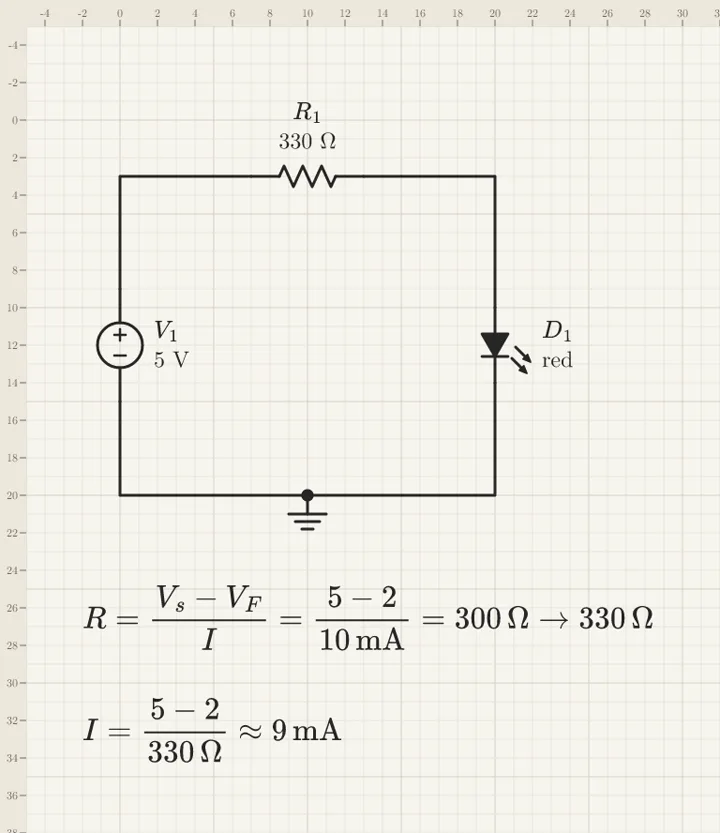
It looks at its own drawing. The AI gets a picture of the sheet with rulers in grid squares, so it sees what you see: a value on a wire, two parts too close. Then it fixes them.
Connect it, step by step
The address of the connector:
https://circuitnotebook.com/mcp
You need a Circuit Notebook account. The first time, your AI app opens a Circuit Notebook page: sign in, then choose what the AI may do, read only or read and draw.
Claude
On claude.ai and in the Claude desktop app.
- Open Customize, then Connectors.
- Click + Add, then Add custom connector.
- Name it Circuit Notebook, paste the address, click Continue.
- Keep the sign-in settings Claude finds, click Continue, then Add.
- Sign in to Circuit Notebook and click Allow.
- In a chat, click +, then Connectors, and turn it on.
Claude’s free plan takes one custom connector.
ChatGPT
On chatgpt.com, on the plans that let you add an MCP server.
- Open Plugins (chatgpt.com/plugins).
- Click +, then Add custom MCP server.
- Name it Circuit Notebook and paste the address under Connection.
- Keep OAuth to sign in, read the warning, choose I understand and want to continue, then Create as a plugin.
- Sign in to Circuit Notebook and click Allow.
- In a chat, type @ and pick Circuit Notebook.
Claude Code, Cursor, VS Code
And any app that connects to an MCP server over the web.
-
Claude Code:
claude mcp add --transport http circuit-notebook
                  https://circuitnotebook.com/mcp
, then/mcpto sign in. -
Cursor: in
~/.cursor/mcp.json,{"mcpServers": {"circuit-notebook": {"url": "https://circuitnotebook.com/mcp"}}} - VS Code: run MCP: Add Server, choose HTTP, paste the address.
- An app that takes a token instead: make one in the app, Account → Connected AIs. It lasts 90 days.
Steps checked against each app’s help on 5 November 2026. Menus move: if a label differs, look for “custom connector” or “MCP server” in your app’s help.
How much it can draw
| Free account | Premium | |
|---|---|---|
| Reading, explaining, checking | No daily limit | No daily limit |
| Drawing steps | 40 a day | 2,000 a day |
| Custom symbols | None | 50 a day |
| Pictures | None | 30 a day |
A drawing step is one thing placed or changed: a part, a wire, a label, a text. Ten parts in one go are ten steps. Reading never counts. An AI can make 60 calls a minute at most, which stops a runaway loop.
When today's steps are used, they come back tomorrow. To go on now, take a credit pack:
- 1,000 steps for 4.99 €
- 3,000 steps for 9.99 €
Credits are used only after the day's steps, and they never expire.
What your AI sees, and how to unplug it
- Only what you can open. It reaches the projects your account has on the server, when it asks for them. Projects kept in your browser stay out of its reach, and so do the ones shared with you as “view, no export”.
- What it reads goes to your AI app, and to the company behind it (Anthropic, OpenAI…), under its terms. Circuit Notebook never sees your conversation. It keeps what the AI drew in your project, how many steps it used each day (for the limits, 30 days), and when it was last used.
- With your rights, in plain sight. It cannot change a sheet you may only view. Its changes show live to everyone on the project.
- Nothing lost. Before its first change to a project, a version is saved in the History: one click brings everything back.
- Unplug it any time. In the app, Account → Connected AIs → Disconnect: it stops at once. You can also remove it from your AI app.
More in the privacy policy.